Show Me the Way to Go Anywhere – Navigation for Mobile Applications

• 9 min read

790 Shares

It doesn’t matter how great the functions and content, that your mobile apps serve, are – if your user can’t find them, they aren’t going to contribute to a great user experience. Navigation on the mobile web comes with challenges thanks to the reduced screen real estate available on smartphones. However, there are some good best practice guidelines to get your mobile app’s navigation moving in the right direction.
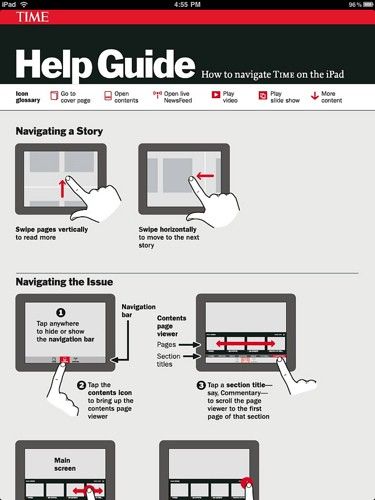
Author/Copyright holder: Mike Lee. Copyright terms and licence: CC BY 2.0

Users on smartphones don’t always have the time to hunt for what they need in a mobile app. With up to 150 interactions with a smartphone a day; the easier it is for a user to get to where they want to be – the more likely it is that they will find the experience of using your mobile app a pleasing one.

There are three considerations to bear in mind when designing navigation systems for mobile apps:

  • Top level infrastructure – how can people move around the app easily

  • Local cues – spatial constructs that enable the user to understand where they are

  • Guides – signs, symbols, etc. that help guide the user through a location

Top Level Infrastructure

There are many ways to manage navigation at the top-level and some of the most common are:

  • Hierarchical Tree Navigation

  • Nested Doll Navigation

  • Hub and Spoke Navigation

  • Bento Box Navigation

  • Filtered View Navigation

Hierarchical Tree Navigation

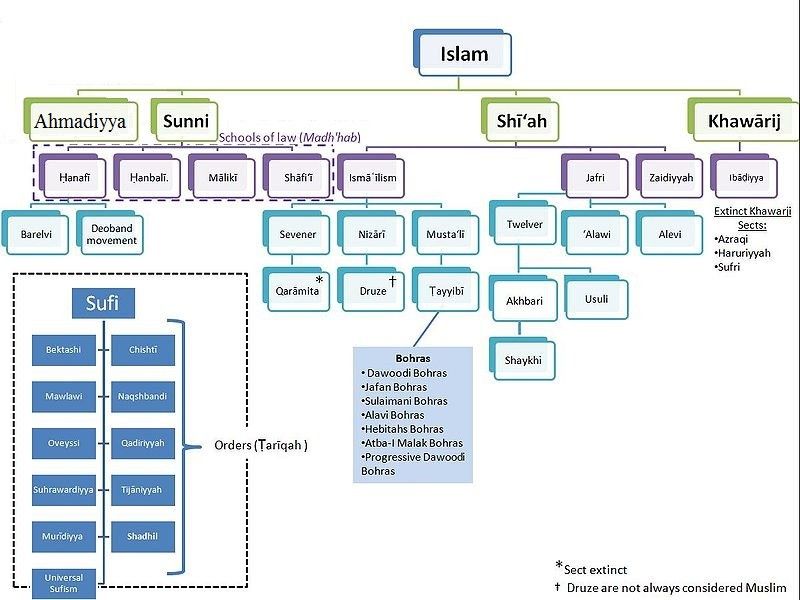
This is the most common form of navigation in traditional websites and applications. It provides a top-level category for navigation followed by further layers of content in sub-categories below that level.

The drawback is that this model can quickly become difficult to accommodate on the mobile screen; the more content you have, the more difficult it is to squash all that data into the screen.

The image below shows how an app might handle the navigation through the different sects of Islam using a hierarchical structure.
Author/Copyright holder: Aurelius787. Copyright terms and licence: CC BY-SA 3.0

Nested Doll Navigation

This is a more typical navigation system for mobile apps. Each time the user moves to a level in the hierarchy of navigation – new items below it are revealed. It uses a move from broad overviews to more specific details. It works well on the small screen but it can be challenging to support horizontal movement between sections when implemented. It gets its name from the concept of nested dolls which are a series of dolls which fit within each other (pictured below).

Author/Copyright holder: Pixabay. Copyright terms and licence: Free Use.

Hub and Spoke Navigation

This model uses a single central screen which acts to enable the user to explore different sections (spokes) of the app. If you wish to shift from one spoke to another – you must do so via the hub. This is a good way of minimizing onscreen noise and works very well for apps that are more concerned with task execution than presenting large volumes of content.

Bento Box Navigation

This model presents a dashboard of choices that delivers dynamic information on a single screen. Elements can then be interacted with to reveal more data. This works very well when using an app that aggregates multiple-data sources.

Filtered View Navigation

Filtered view navigation is based on allowing the user to manipulate a single data set from many perspectives – filters are user defined/controlled.

A Final Note on Top Level Infrastructure

In more complex applications it may be useful to combine different types of navigation so that the user is supported in an individual task or interaction in the way that is most suitable and when they change that task/interaction the navigation system adapts to the new choice.

Local Cues

Local cues are there to help the user orient themselves in the space that they are in. It is better to use these sparingly so that when the user encounters them – they are absolutely certain what they mean. Use too many and they are likely to conflict with each other.

Landmarks

A landmark is an instantly recognizable object that lets the user know exactly where they are. They are often used by drivers in real life (such as “The Eiffel Tower! I’m in Paris!”) and can be used in a similar way in the mobile app. Typical mobile app landmarks might include:

  • Logo or Home Icon

  • Clear primary navigation

  • Breadcrumbs

  • Search boxes

  • Section headers/banners

  • Section navigation tools

  • Slideshows/galleries/calendars/etc.

Ideally you should pay careful attention to the form, colour, priority on page, position and visibility of landmarks so that they deliver a consistent user experience. Landmarks should not vary unless it is absolutely essential.

Boundaries

Boundaries denote, on the screen, where a user may or may not interact and how they may interact. The box around a button, for example, shows the boundary of the button’s area of action.

Guides

Guides are the visual signposts that help with decision making at any point in your app or website. They tend to be non-verbal (icons, buttons and images) but labels play an important role too.

Icons

Icons should, wherever possible, fit the user’s mental model of that icon. Icons that don’t meet these criteria are apt to be confusing and add cognitive friction to the act of conducting a task. You can ascertain the mental model through research. Remember even the simplest icon may be confusing – a pencil icon, for example, might mean “draw something” or it might mean “write something”. Your users’ mental models will tell you what it means to them.
Author/Copyright holder: Pixabay. Copyright terms and licence: Free Use

Labels

Labels are important research shows that text and images are more effective in guiding users than text but it also shows that images are less effective than text on its own.

The Take Away

Navigation is a vital part of the user experience for mobile apps and getting it right will ensure that users can open your app, get to where they want to be and then get moving on something else. This in turn, is likely to incentivize long-term adoption of your mobile app rather than short-term use and then abandonment. The three levels of navigation given above all need careful attention to get the navigation just right for your users.

References

You can find some interesting navigation UI patterns here at UXPin.

You can find some more navigation UI patterns here.

Hero Image: Author/Copyright holder: Pixabay. Copyright terms and licence: Free to use

Learn More in This Course:

AI for Designers

11 days
13 % booked
View Course

What You Should Read Next

  • Read full article
    What is Interaction Design? - Article hero image
    Interaction Design Foundation logo

    What is Interaction Design?

    Interaction design is an important component within the giant umbrella of user experience (UX) design. In this article, we’ll explain what interaction design is, some useful models of interaction design, as well as briefly describe what an interaction designer usually does.A simple and useful unders

    Social shares
    1.5k
    Published
    Read Article
  • Read full article
    Apple’s Product Development Process – Inside the World’s Greatest Design Organization - Article hero image
    Interaction Design Foundation logo

    Apple’s Product Development Process – Inside the World’s Greatest Design Organization

    Apple’s Product Development Process may be one of the most successful design processes ever implemented. With a valuation that exceeds $2 trillion, there’s a lot that designers can learn from Apple and introduce into their own design environments.Apple is a notoriously secretive business. In Steve J

    Social shares
    1.4k
    Published
    Read Article
  • Read full article
    10 Great Sites for UI Design Patterns - Article hero image
    Interaction Design Foundation logo

    10 Great Sites for UI Design Patterns

    You don’t want to spend your whole life redesigning the wheel, do you? No, neither do we. If you are looking for a design that solves a problem that has been solved with a different application before, then the template for your wheel is probably already out there. This lets you save time and make a

    Social shares
    1.4k
    Published
    Read Article
  • Read full article
    Shneiderman’s Eight Golden Rules Will Help You Design Better Interfaces - Article hero image
    Interaction Design Foundation logo

    Shneiderman’s Eight Golden Rules Will Help You Design Better Interfaces

    Follow Ben Shneiderman’s 'Eight Golden Rules of Interface Design' if you want to design great, productive and frustration-free user interfaces. Apple, Google and Microsoft are among some of the highly successful companies whose well-designed products reflect Shneiderman’s rules. The characteristics

    Social shares
    1.4k
    Published
    Read Article
  • Read full article
    User Interface Design Guidelines: 10 Rules of Thumb - Article hero image
    Interaction Design Foundation logo

    User Interface Design Guidelines: 10 Rules of Thumb

    Learn to design with your user’s needs and expectations in mind by applying Jakob Nielsen and Rolf Molich’s Ten User Interface Guidelines. These heuristics have been reflected in many of the products designed by some of the most successful companies in the world such as Apple, Google, and Adobe. Fur

    Social shares
    1.4k
    Published
    Read Article
  • Read full article
    How to Change Your Career from Graphic Design to UX Design - Article hero image
    Interaction Design Foundation logo

    How to Change Your Career from Graphic Design to UX Design

    If there’s an occupation that is 100% linked with the public’s idea of what design is all about, it’s graphic design. From the familiar golden arches of the McDonald’s brand to the typography and colors of movie posters, graphic designers create some of the most iconic and ubiquitous designs around

    Social shares
    1.4k
    Published
    Read Article
  • Read full article
    Repetition, Pattern, and Rhythm - Article hero image
    Interaction Design Foundation logo

    Repetition, Pattern, and Rhythm

    Let’s look at three subjects that, at first glance, may strike you as being incredibly basic and self-explanatory. However, although they may seem like they should need no introduction, we should study them. By understanding these concepts, you’ll be able to apply them more effectively to captivate

    Social shares
    1.4k
    Published
    Read Article
  • Read full article
    The Grid System: Building a Solid Design Layout - Article hero image
    Interaction Design Foundation logo

    The Grid System: Building a Solid Design Layout

    Now that we’ve seen some grids at work in the Rule of Thirds article, let’s examine them a little more deeply. As a concept that deals so fundamentally with the fabric and background of our work as designers, it’s easy to overlook the power of grids and think more about the elements we want to creat

    Social shares
    1.4k
    Published
    Read Article
  • Read full article
    The Principles of Service Design Thinking - Building Better Services - Article hero image
    Interaction Design Foundation logo

    The Principles of Service Design Thinking - Building Better Services

    Service design is all about taking a service and making it meet the user’s and customer’s needs for that service. It can be used to improve an existing service or to create a new service from scratch. In order to adapt to service design, a UX designer will need to understand the basic principles of

    Social shares
    1.4k
    Published
    Read Article
  • Read full article
    The Golden Ratio - Principles of form and layout - Article hero image
    Interaction Design Foundation logo

    The Golden Ratio - Principles of form and layout

    Now, we’re going to look at a subject that comes directly from mathematics and that we can also find all around us – the golden ratio. Don’t worry; we’re not going back into the classroom for long. We will examine what this concept is and exactly how much it is a fundamental part of making designs p

    Social shares
    1.3k
    Published
    Read Article

Top Articles

Top Topic Definitions

Feel Stuck?
Want Better Job Options?

AI is replacing jobs everywhere, yet design jobs are booming with a projected 45% job growth. With design skills, you can create products and services people love. More love means more impact and greater salary potential.

At IxDF, we help you from your first course to your next job, all in one place.

See How Design Skills Turn Into Job Options
Privacy Settings
By using this site, you accept our Cookie Policy and Terms of Use.
Customize
Accept all

Be the One Who Inspires

People remember who shares great ideas.

Share on:

Academic Credibility — On Autopilot

Don't waste time googling citation formats. Just copy, paste and look legit in seconds.

Feel Stuck? Want Freedom?

Join 326,033+ designers who get one powerful email each week. Learn to design a life you love.

Next email in
1
day
10
hrs
40
mins
5
secs

Free forever. No spam. Unsubscribe anytime.