Rock climbing is an example of Csikszentmihalyi's flow theory and optimal experience.

Design for Optimal Experience

by William Hudson • • 21 min read

476 Shares
Save

The range of our emotions and feelings is very broad, which begs the question, when do we perform at our best? We know that boredom can be crucial in problem-solving, but that doesn't necessarily mean that your performance and engagement with an activity is going to be optimal when you're bored; it's likely to be the reverse. But similarly, we're not at our best when we're over-stimulated.

Happily, this is a question that has received a lot of research attention. In the clip below, HCI Professor Alan Dix takes us through three topics relevant to design for optimized performance:

  • Yerkes-Dodson's curve

  • Csikszentmihalyi's theory of flow

  • Zone of proximal development

The first two are most relevant to experts in their field, with tasks they are very practiced at performing. The zone of proximal development is more about how to get learners to expert level. All three concepts are important in interaction and user experience design.

Transcript

Coincidentally, the curve associated with the Yerkes-Dodson law (which states that performance suffers when arousal is very high or very low) is also applicable to Csikszentmihalyi's flow. Both describe the zone of optimal performance. Consequently, in interaction design we don't want extremes of arousal. We need tasks and user journeys that are neither too tedious nor too challenging. This is where the zone of proximal development (ZPD) comes in. ZPD underlines the idea that we build on users' familiarity and experience. Alan describes this as being similar to the use of training wheels while a child is learning how to ride a bicycle. But a training wheels approach is not always the best solution since there are issues with over-reliance on the added support and the need to decide when to remove them. In fact, similar approaches were used by Microsoft (and others) in the early days of graphical user interfaces, primarily the 1990s and early 2000s. New users of Microsoft Word were presented with "short menus" by default. This provided a more manageable subset of menus, but of course there were features that some users might need that were not shown. Users then had to find and enable full menus, which presented a new and overwhelming list of items in each menu. The screenshots below show the Microsoft Word "Insert" menu before and after the full interface was enabled. The number of menu items increases from 5 to 17!
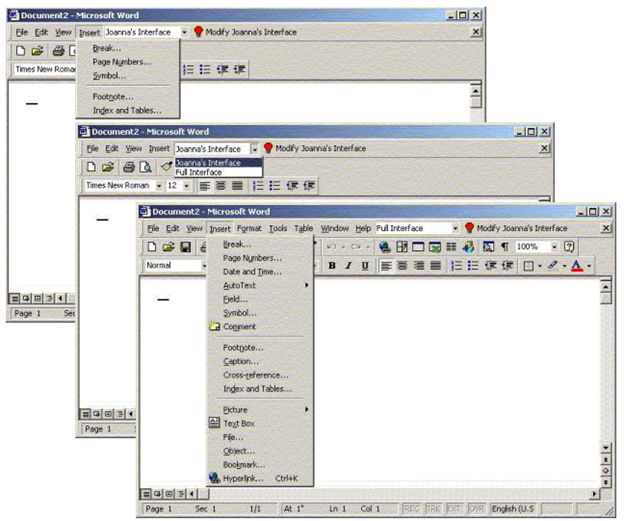
Screenshot showing early Microsoft Word Insert menu expand from 5 to 17 items when full menus enabled

Illustration of Insert menu before and after full menus were enabled

© McGrenere, et al., Fair Use

Variations on this theme were also attempted, including an adaptable interface that gave precedence to menu items recently used. See Joanna McGrenere's paper on this subject in the references below.

In modern interaction design it is not unusual to see some form of training mode, but typically these are short tutorials rather than a limited state of the interface. A concept called "progressive disclosure" is a much more common and useful approach to interface complexity. It is based on the principle of presenting users with the most important and commonly used features first and hiding more advanced features towards the bottom of a dialog or on separate "more" or "advanced" pages. See the references below for two sources on progressive disclosure.

The Take Away

We're not at our best when we're either really bored or way too hyped up. The Yerkes-Dodson curve, Csikszentmihalyi's flow theory, and the zone of proximal development provide us with three key approaches on how we can perform at our peak. The Yerkes-Dodson curve says that we do our best when we're somewhere in the middle of feeling super hyped up or feeling really sluggish. Flow theory explains that we perform best when we're doing things that are challenging but still doable, right on the edge of our abilities. These ideas are especially important for UX designers as we work with how people interact with technology.

References and Where to Learn More

Learn More in This Course:

Learn Design and AI From the Best

Get one powerful email each week, like 248,126 others.

Next email in:

What You Should Read Next

  • Read full article
    What Does a User Interface (UI) Designer Do? - Article hero image

    What Does a User Interface (UI) Designer Do?

    What’s in every memorable digital experience is a seamlessly navigable website or an app that feels like second nature—and what lies behind those are user interface (UI) designers; they’re the ones who shape the aesthetics and functionality of any digital interface. But what does a user interface de

    Social shares
    616
    Published
    Read Article
  • Read full article
    Should You Choose between Responsive and Adaptive Design? - Article hero image

    Should You Choose between Responsive and Adaptive Design?

    Designers can choose between adaptive and responsive design to bridge the gap between devices and changing user contexts. Here you’ll learn the merits of each approach, so you’re in a great position to select an approach for your project.  What Are the Main Differences Between Responsive a

    Social shares
    566
    Published
    Read Article
  • Read full article
    System Usability Scale for Data-Driven UX - Article hero image

    System Usability Scale for Data-Driven UX

    Ever wondered how the top designers, researchers, and product developers manage to create products that are user-friendly, efficient, and enjoyable—consistently? One of the key things there is what’s called the System Usability Scale (SUS), a vital tool and questionnaire-based method that profession

    Social shares
    967
    Published
    Read Article
  • Read full article
    Don Norman’s Top Tips from the Design for the 21st Century Course - Article hero image

    Don Norman’s Top Tips from the Design for the 21st Century Course

    The design field is evolving. It’s been proven that aside from driving business success and delivering beautiful and successful products, design can be pivotal to solving complex human issues. For instance, GE Healthcare used Design Thinking to improve the MR scanner experience for children—which is

    Social shares
    593
    Published
    Read Article
  • Read full article
    Sustainability Is Not Enough - Article hero image

    Sustainability Is Not Enough

    Sustainable design. Sustainable fashion. Sustainable living. We often hear these terms in marketing campaigns and popular media. But what does sustainability mean and why does pioneer of User Experience Design Don Norman think that sustainability shouldn’t be our goal when we design?In this video, D

    Social shares
    487
    Published
    Read Article
  • Read full article
    Black Friday 2024: Invest in UX Design Education - Article hero image

    Black Friday 2024: Invest in UX Design Education

    “The best investment you can make, is an investment in yourself... The more you learn, the more you'll earn.”—Warren Buffett, Chairman and CEO of Berkshire HathawayHow many items have you added to your Black Friday shopping wishlist? This year, instead of short-term deals on products, why not take a

    Social shares
    565
    Published
    Read Article
  • Read full article
    Why Is AI so Important and How Is It Changing the World? - Article hero image

    Why Is AI so Important and How Is It Changing the World?

    You've heard about AI and all the wonderful (and sometimes scary) possibilities. But unlike sci-fi apocalyptic movies, AI isn't out to destroy humanity. Let's take a look at the challenges and opportunities we face as AI meets design.In this video, Ioana Teleanu, Founder of UX Goodies and former Lea

    Social shares
    488
    Published
    Read Article
  • Read full article
    Who, What, and How: Design Maps Show You the Way for Implementation - Article hero image

    Who, What, and How: Design Maps Show You the Way for Implementation

    For something called a “team project,” it’s amazing how often everyone’s on a different page. Design maps connect the dots. They organize your research, stories of use, and design artifacts into clear, user-centered interfaces that your team can actually build fast. No more “Wait, what did you mean

    Social shares
    405
    Published
    Read Article
  • Read full article
    How Can Designers Adapt to New Technologies? The Future of Technology in Design - Article hero image

    How Can Designers Adapt to New Technologies? The Future of Technology in Design

    The design industry is rapidly evolving with the integration of technologies such as artificial intelligence (AI) and 3D printing. While there may be concerns about job displacement, history has demonstrated that new technologies typically create more job opportunities. Don Norman, author of The Des

    Social shares
    691
    Published
    Read Article
  • Read full article
    Conceptual Models: The Hidden Structure Behind Your Next Great Interface - Article hero image

    Conceptual Models: The Hidden Structure Behind Your Next Great Interface

    Ever wondered why some interfaces feel effortless: like they already know what you’re trying to do, while others leave you guessing? The difference often lies in how well a product’s design matches the way users think. When your interface reflects their mental model, every action feels intuitive, an

    Social shares
    482
    Published
    Read Article

Top Articles

Top Topic Definitions

39% of Today's Skills Will Change by 2030

The World Economic Forum expects 39% of today's skills to be transformed or become outdated by 2030.

The good news is that jobs in UX / UI design and AI are among the fastest-growing professions globally.

Build Skills That Keep You Relevant

Privacy Settings

By using this site, you accept our Cookie Policy and Terms of Use.
Customize
Accept all

Be the One Who Inspires

People remember who shares great ideas.

Share on:

Academic Credibility — On Autopilot

Don't waste time googling citation formats. Just copy, paste and look legit in seconds.

Learn Design and AI From the Best

Get one powerful email each week, like 248,126 others.

Next email in: