Two Simple Priority Sorting Exercise for Your UX Research

• 8 min read

535 Shares

If you’re facing the common dilemma of which features to give priority to in your current release; then there are a couple of simple techniques that you can use to decide which features should be the focus of your attention.

Pair Comparisons Exercise

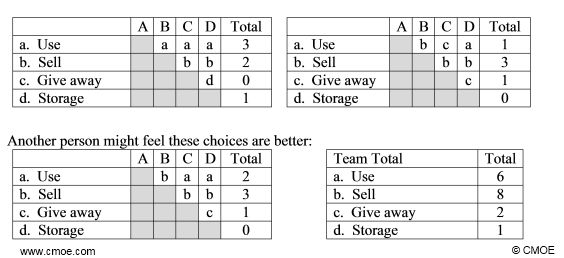
Our first exercise is very simple. Write down each feature on a separate piece of paper. Then compare every single feature to every other feature (this doesn’t take as long as it sounds like it might). You are simply looking for an order of preference. So the question for each pair is; “which feature is the most important? Feature X or Feature Y?”

You can do this by yourself or you can do it in a group. Every time a feature wins a comparison – it gets a point (list all the features on one sheet of paper and record the points by each).

So if you have 5 features you would need to compare; 1 and 2, 1 and 3, 1 and 4, 1 and 5, 2 and 3, 2 and 4, 2 and 5, 3 and 4, 3 and 5, and 4 and 5. That’s 10 comparisons in total.

You don’t have to limit this technique to comparing features, you could also compare competitors, job candidates, or anything else you need to prioritize quickly with it.


The “Buy a Feature” Exercise

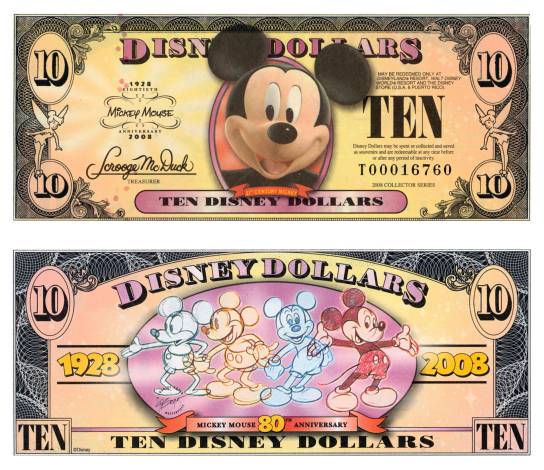
In this exercise you give your participants a stack of cash (virtual currency created yourself ideally – real money is not required). They will use the cash to buy features from a list of features. You price the features based on how much effort they will take to implement. So a simple feature might be 1 Mickey Mouse Money and a more complex one might be 20 Mickey Mouse Money.

The key to the exercise is that the players aren’t provided with enough cash to buy all the features (or otherwise the game would be pointless) and thus are forced to prioritize what they really want. It may be that they want a couple of expensive but incredibly useful, from their perception, features or it may be that they want a laundry list of smaller features.


How to Play – Developing a List of Features

Given that every product is different; there is no standard list of features that you can use. However, building your list will normally involve listing the features asked for by users, features used in competitors’ products, features that you’ve come across during the research phase of your UX project and any other features identified within the business as possibly useful too.

It’s important that the features you list are meaningful to users. So this exercise is of low value if you want to discuss backend or technical details. Users don’t care what programming language you use or how you optimize your databases – that’s not their purview. They do care about how they can share things with friends or how they can save stuff for later use, for example.

It’s important not to overwhelm your users in this exercise. You don’t want to present them with a list of 200 features because they’ll find it impossible to provide meaningful feedback – there’s too much choice in that kind of list. The ideal list is going to be no more than 25-30 features long. If it’s much longer than that – reduce the feature list in house (use the pair comparisons exercise above to do that) before compiling the final list.

Finally, you want to write each feature on a separate card and include its name, a brief description of the feature and of course the price of the feature. Pricing should always be based on the complexity of implementation. Something that’s twice as hard to implement as something else – should cost twice as much.

How to Play - Deciding How Much Cash to Give Your Participants

The object of this exercise is to get people to make decisions about what matters to them and that means limiting their supply of cash. If they can buy every feature – you won’t learn anything. You need to get the participants to make hard decisions about what they want.

We think that “enough” is probably the right amount to buy 1/3 – ½ of the features on the table. Don’t choose a currency that relates to your local currency; it tends to make users think of the cost of the work you’re doing. Just pick something random (Mickey Mouse Money) and use that instead.

Then make the money and print it out to go with the feature deck (or raid your local Monopoly set for pre-printed cash).

How to Play – Setting Up Shop

You can run this exercise with up to 4 people (any more and it becomes really confusing) at once but 1 on 1 is good too. You pretend to be a shop keeper. Your participants can see the prices and they have the money.

They are free to ask questions before they make a purchase or purchases. This allows you to guide them through features if they’re not quite sure what the descriptions on the cards mean. They are not required to spend all their money. After all, you don’t want people selecting features they don’t want.

The participant hands over money to the shop keeper for every feature they purchase. The shop keeper should ask why they want the feature and make a note of the reasoning.

The exercise ends when either they have run out of money or they have purchased all the features that they are interested in.



Summary

When trying to select priorities and preferences it can be quite tricky to do it from a list. These two exercise make it much easier to assign priorities and make decisions based on them. Neither technique requires anything more than a little paper and a little time and can thus be used in almost any UX environment even if there’s not much budget for UX testing.

Imgs:

Not Just ITSM

http://www.cmoe.com/blog/wp-content/images/Paired-Comparison-Anlysis.jpg

Disney Dollars

Setting Up Shop

Learn More in This Course:

AI for Designers

9 days
19 % booked
View Course

What You Should Read Next

  • Read full article
    Why Care about Statistical Significance? - Article hero image
    Interaction Design Foundation logo

    Why Care about Statistical Significance?

    The categorical data depicts the success and failure rate of the low-fidelity wireframe above. There is not a large enough difference between the two to determine if the designs were successful.There is an element of error involved in measuring anything. So, when we want to compare measurements, how

    Social shares
    432
    Published
    Read Article
  • Read full article
    Web Fonts: Definition and 10 Recommendations - Article hero image
    Interaction Design Foundation logo

    Web Fonts: Definition and 10 Recommendations

    Web fonts bring digital content to life. They enhance readability, set the tone, and ensure consistency across various platforms—all vital ingredients. When you understand web fonts and their impact, it can help you with effective website creation—and greatly so. We’ll provide a comprehensive overvi

    Social shares
    781
    Published
    Read Article
  • Read full article
    How to Screen Research Participants - Article hero image
    Interaction Design Foundation logo

    How to Screen Research Participants

    Finding the right participants is crucial for gathering user research. We usually need to do research with participants having a particular set of needs or experience. In this short video, you will find out about the basic need for screening and how we make sure that we have suitably qualified parti

    Social shares
    450
    Published
    Read Article
  • Read full article
    Pitfalls in Recruiting Participants for User Research - Article hero image
    Interaction Design Foundation logo

    Pitfalls in Recruiting Participants for User Research

    The level of participant engagement is an important part of the user research results. Our results are dependent on proper engagement with our participants. In this video we look at some of the issues around participant recruitment and hear practical examples that arose in a large online study.[[vid

    Social shares
    419
    Published
    Read Article
  • Read full article
    How to Fit Quantitative Research into the Project Lifecycle - Article hero image
    Interaction Design Foundation logo

    How to Fit Quantitative Research into the Project Lifecycle

    Quantitative research methods fit into the project lifecycle at different stages of the process.In this video, we see where different quantitative research methods fit into a typical project lifecycle. Bear in mind that even with an iterative process such as Agile, the short cycles still address dif

    Social shares
    510
    Published
    Read Article
  • Read full article
    How to Resolve Conflicts Between Design Thinking and Marketing - Article hero image
    Interaction Design Foundation logo

    How to Resolve Conflicts Between Design Thinking and Marketing

    In the past, designers often reported to marketing managers and were neither expected nor allowed to make business decisions. When traditionally-structured companies transition to a design-driven mindset, there can be friction between the marketing and design teams. Let’s take a closer look at this

    Social shares
    682
    Published
    Read Article
  • Read full article
    Stop the Generic Portfolio Trap! Design a Stand-Out Portfolio for Your UX/UI Niche: User Research - Article hero image
    Interaction Design Foundation logo

    Stop the Generic Portfolio Trap! Design a Stand-Out Portfolio for Your UX/UI Niche: User Research

    User research is indispensable—and without it, well... UX design is guesswork. When you’re a user researcher, you know this well—but it can be hard to communicate your work in a way that grabs the viewer and holds their attention. And that’s what a portfolio is all about—grabbing the attention of yo

    Social shares
    383
    Published
    Read Article
  • Read full article
    Top Service Blueprint Templates - Article hero image
    Interaction Design Foundation logo

    Top Service Blueprint Templates

    Service blueprint tools are vital for effective customer experience design—and for designers to make experiences that are exceptional. Here, we’ll discuss why these tools are so important. What’s more, we’ll explore templates and practical resources to create high-quality, efficient service blueprin

    Social shares
    638
    Published
    Read Article
  • Read full article
    How to Write Research Questions that Lead to Confident Design - Article hero image
    Interaction Design Foundation logo

    How to Write Research Questions that Lead to Confident Design

    Designing with Data provides an extensive background to A/B testing.As with all other research methods, we need to start with a research question. A/B testing concerns itself with changes in user behavior, meaning that our questions need to be centered on measurable goals. In many cases, these will

    Social shares
    450
    Published
    Read Article
  • Read full article
    Getting Started - Article hero image
    Interaction Design Foundation logo

    Getting Started

    We start our introduction to A/B and multivariate testing (MVT) by looking at their basic principles and their differences. Note that the video mentions Google Optimize, which has been withdrawn. Google Firebase can be used for mobile platforms. Third-party solutions are needed for A/B testing on th

    Social shares
    225
    Published
    Read Article

Top Articles

Top Topic Definitions

Feel Stuck?
Want Better Job Options?

AI is replacing jobs everywhere, yet design jobs are booming with a projected 45% job growth. With design skills, you can create products and services people love. More love means more impact and greater salary potential.

At IxDF, we help you from your first course to your next job, all in one place.

See How Design Skills Turn Into Job Options
Privacy Settings
By using this site, you accept our Cookie Policy and Terms of Use.
Customize
Accept all

Be the One Who Inspires

People remember who shares great ideas.

Share on:

Academic Credibility — On Autopilot

Don't waste time googling citation formats. Just copy, paste and look legit in seconds.

Feel stuck? Want Freedom?

Get one powerful email each week, like 325,761 others.

Learn to design a life you love.

Next email in:
5
days
16
hrs
46
mins
38
secs