Hands use a mouse and stylus beside printed layouts with text and color swatches, a keyboard, and monitor

Designing Copy with the User in Mind

• 5 min read

407 Shares
Save

Want to design your copy so that it improves the user experience? You’re not alone. So we’ve come up with a short list of tips that should help create more valuable copy on your website or in your application:

Use Labels


Author/Copyright holder: oddharmonic. Copyright terms and licence: CC BY-SA 2.0

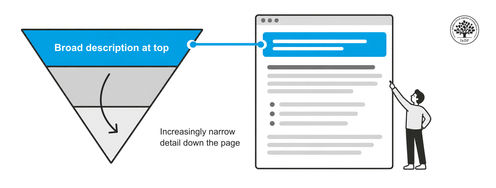
If you want your users to know what you’re talking about – tell them. This is in fact one of the key rules of presenting data in real life too. Tell people what you are going to tell them, then tell them, and then come back and summarize what you told them. This helps retention of information and makes it much clearer as to whether people should stick around for you to do the telling.

In copy that means clear headlines and sub-headings. Make sure that these are clear and informative. It’s OK to be witty or clever too but not at the expense of clarity.

Make Your Links Valuable

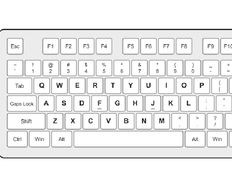
We’ve done a whole article on why the words “click here” suck. A link should be informative; the text should tell a user what they will learn when they do hand out that all important click. The good news is that writing clear links will also improve your search engine optimization; Google looks at links and the descriptions and tries to see if they are related to the content of the landing page.



Author/Copyright holder: amattox mattox. Copyright terms and licence: CC BY-NC 2.0

So use names and descriptions in your links and don’t be vague about where they go. It should, as an added bonus, also improve your users’ trust in your website.

Look at Space in Your Design

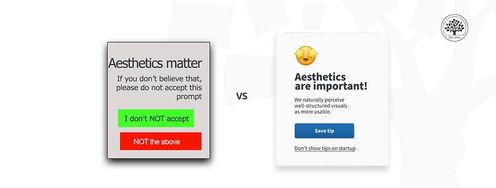
Great graphic design can be undone by the copy that fills it. If you are selling a highly technical product and need to convey that information to your users than a gorgeous display with room for exactly 5 words of text – is worse than useless. The same goes for space for endless product descriptions when the product is too simple to need that kind of explanation. Could you write 300 words about a $5 wine glass? And even if you could; could you find anyone who would actually want to read those 300 words?



Author/Copyright holder: David Sillitoe. Copyright terms and licence: All rights reserved Img source

The space you allocate for text needs to be useful in the context of how that text will be used. Otherwise you won’t be able to give people what they need or you’ll have to bore them to death with long, ponderous descriptions.

Text Needs to Be Placed Appropriately

Look at the overall design and ask whether the text is in the right place? It’s all too easy to try and stuff everything you think a user might need on the home page but in practice that’s a great way to send users running for the hills. If you need lengthy product descriptions – create individual products pages with the space for it. If you want to write 5,000 word blog posts, that’s awesome, but make sure they integrate with the layout properly.

Designing with copy in mind takes no longer than ordinary design. It just means raising your awareness of your users’ needs before you put pen to paper.

Header Image: Author/Copyright holder: Unknown. Copyright terms and licence: Unknown. Img Source

Learn More in This Course:

Learn Design and AI From the Best

Get one powerful email each week, like 312,999 others.

Next email in:

What You Should Read Next

  • Read full article
    Structure First: The Inverted Pyramid and Visual Organization - Article hero image

    Structure First: The Inverted Pyramid and Visual Organization

    This clip examines two principles that work hand in hand to make web content readable: the inverted pyramid approach to information order and the use of visual structure to help users scan efficiently. William Hudson, UX Strategist and Founder of Syntagm Ltd, describes the theoretical basis and prac

    Social shares
    165
    Published
    Read Article
  • Read full article
    What Is Card Sorting? - Article hero image

    What Is Card Sorting?

    In this video, William Hudson, UX Strategist and Founder of Syntagm Ltd, introduces card sorting: what it is, where it comes from, and the broad range of problems it can help solve.Card sorting is a research technique in which participants organize a set of items into groups that make sense to them,

    Social shares
    134
    Published
    Read Article
  • Read full article
    Design Accessible Navigation for Keyboards and Screen Readers - Article hero image

    Design Accessible Navigation for Keyboards and Screen Readers

    Accessibility is often treated as a finishing touch, but for navigation, it belongs at the foundation. Menus are how users reach everything else on a site, so a menu that works only with a mouse quietly shuts out anyone who depends on a keyboard, a screen reader, or another form of assistive technol

    Social shares
    139
    Published
    Read Article
  • Read full article
    The Scent of Information: Give Users the Confidence to Click - Article hero image

    The Scent of Information: Give Users the Confidence to Click

    William Hudson, UX Strategist and Founder of Syntagm Ltd, introduces the scent of information as a model for understanding how users navigate toward their goals, and sets out the principles for writing navigation links that strengthen that scent.Information Foraging and the Scent of InformationThe s

    Social shares
    137
    Published
    Read Article
  • Read full article
    4 UI Design Tips Every Designer Needs to Know - Article hero image

    4 UI Design Tips Every Designer Needs to Know

    User interface (UI) design can make or break any digital product. A user often won’t even notice when they interact with a great UI. They feel the visual appeal and simply trust it. On the contrary, a bad UI design can prevent the user from interacting with a product intuitively or at all and lead t

    Social shares
    645
    Published
    Read Article
  • Read full article
    How to Design Use Cases in UX - Article hero image

    How to Design Use Cases in UX

    Imagine a new mobile app or an e-commerce site gets launched; it looks great, sure, and it should be a hit because it at least looks like it’s got what it takes, but—drumroll—it tanks in the marketplace, all because people find it hard to complete even the simplest tasks. That’s rough, but—behind th

    Social shares
    803
    Published
    Read Article
  • Read full article
    How to Become a Product Manager: Best Career Advice - Article hero image

    How to Become a Product Manager: Best Career Advice

    Pick any product and you’ll find that product management is vital to how successful it is—and product managers are who make sure that a product’s life cycle runs smoothly, and it means they know how to align strategy, vision, and user needs. Product managers split into multiple roles that have got u

    Social shares
    601
    Published
    Read Article
  • Read full article
    Bad UX Exposed: A Comprehensive Guide to Avoiding Pitfalls - Article hero image

    Bad UX Exposed: A Comprehensive Guide to Avoiding Pitfalls

    In today’s vibrant digital design landscape, creating meaningful connections with users goes beyond offering innovative products or services. It leads us into the world of user experience design (or UX design). This critical factor shapes our interaction with the users and plays a big role in making

    Social shares
    974
    Published
    Read Article
  • Read full article
    Understand the Various Types of Creativity - Article hero image

    Understand the Various Types of Creativity

    When you want to be more creative, you’ll want to learn the techniques for creative thinking and understand the various forms of creativity and creative processes. This video will give you an overview of some of the different forms of creativity. For example, you’ll learn that there are two types of

    Social shares
    575
    Published
    Read Article
  • Read full article
    Design Podcasts to Learn UX on the Go - Article hero image

    Design Podcasts to Learn UX on the Go

    As digital designers, we know the bulk of our day is spent looking at screens. Give your eyes some rest, and tune into podcasts instead. They are a great way to stay updated, gain insights, be inspired or experience “A-ha” moments. The best part about podcasts is that unlike reading or watching vide

    Social shares
    641
    Published
    Read Article

Top Articles

Top Topic Definitions

39% of Today's Skills Will Change by 2030

The World Economic Forum expects 39% of today's skills to be transformed or become outdated by 2030.

The good news is that jobs in UX / UI design and AI are among the fastest-growing professions globally.

Build Skills That Keep You Relevant

Privacy Settings

By using this site, you accept our Cookie Policy and Terms of Use.
Customize
Accept all

Be the One Who Inspires

People remember who shares great ideas.

Share on:

Academic Credibility — On Autopilot

Don't waste time googling citation formats. Just copy, paste and look legit in seconds.

Learn Design and AI From the Best

Get one powerful email each week, like 312,999 others.

Next email in: