10 Tips for Improving the UX of Your Terms and Conditions

• 8 min read

699 Shares

There is, perhaps, no area of the user experience that sucks harder than the average terms and conditions page for a website or application. These giant legalese documents are supposed to protect the provider from any possible legal avenue of recourse. In practice, nobody reads them.

It’s been estimated that it takes up to 25 minutes just to plough through most t’s and c’s. Users are way too busy to bother – so they do what everyone has done since time immemorial; they click “I accept” and hope that they haven’t signed over the soul of their first born child in doing so. (In fact in one famous April Fool’s day prank – GameStation actually did take their user’s souls in their t’s and c’s).

This isn’t how it should be. Terms and conditions aren’t fair to a user who isn’t going to read them. We suspect that in Europe, at least, this isn’t going to be allowed for much longer either. You can’t seriously expect to hold someone to terms that they’ve not read. What’s desperately called for here is a simplification of terms and conditions and for them to reflect the bigger user experience picture.

10 Tips for Improving the UX of Terms and Conditions

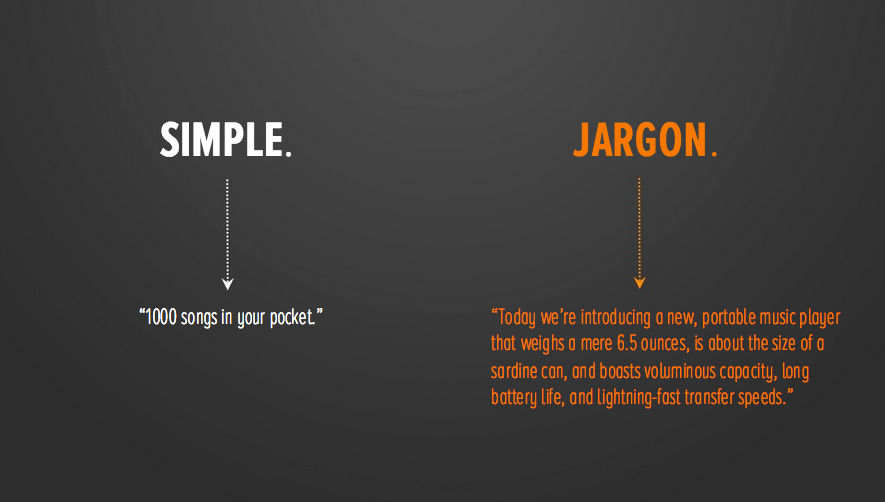
Use Plain English

We appreciate that your lawyers need to use lots of legal words and jargon – that’s the nature of the law. The trouble is that this isn’t accessible to the majority of users out there. They aren’t lawyers and they shouldn’t have to be to understand what’s expected of them.

If you can’t dispense with all that legal terminology – you can make it easier to understand. Put summary paragraphs in plain English against each paragraph. If your terminology doesn’t appear in a reduced dictionary (a dictionary which focuses on the most common terms in everyday use) then remove it and find a term that does. 


Author/Copyright holder: The Daily Rind. Copyright terms and licence: All rights reserved Img source

Less Words is More

We all know that a picture is worth a thousand words; that’s taken as given in a design community. But what many people fail to appreciate is that a well-constructed sentence is worth a badly constructed paragraph or even a terribly constructed page.

Keeping the number of words in a sentence to a minimum aids reading comprehension. Many users aren’t going to be first language speakers and many first language speakers struggle with long sentences. So keep your word count down.

Simplicity is Important

Just as important as keeping the number of words to a minimum is keeping complexity to a minimum. Sentences with a dozen clauses don’t belong in a user friendly environment. Keep syntax and other linguistic devices simple. Short sentences are better than long sentences.

Paragraphs Should Contain One Simple Idea

The humble paragraph is designed to separate ideas. If your paragraphs are nearly a page long – they’re not serving their purpose.

Put each new idea in a separate paragraph.

This makes it easier for someone to scan the text to find what they need. It also reduces the chances of someone falling into a coma whilst ploughing through your incredibly dull terms and conditions.

And it’s important to remember that to your users – all your terms and conditions are dull.

Use Highlighting to Draw Attention to Key Concepts

Just by using the bold function or the italic function you can draw people’s attention to the really important stuff in your terms and conditions. If you really must, you can also use different colours or sizes of type to do this but it reduces accessibility to disabled users – so only do this if you have a very strong reason to do so. Bold and italic works for everyone.

Don’t be Afraid to Use Sub-Headings

Newspapers do it. We do it here on the UX Daily (and we’ve done it in this article). Sub-headings make it easier for text to stand alone and for people to pay attention when they feel they need to. It makes navigating through a long, tedious document much easier. It’s also more aesthetically pleasing. Why? Who knows? It just is.
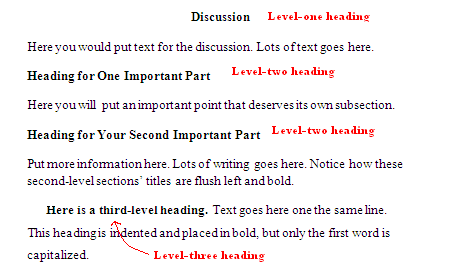


Author/Copyright holder: Kirsten Borne. Copyright terms and licence: All rights reserved Img source

DON’T SHOUT AT YOUR AUDIENCE

There’s a certain person who writes terms and conditions out there who seems to believe that people who read terms and conditions are visually deaf. THEIR EULAS AND PARAGRAPHS ARE ALWAYS IN BLOCK CAPITALS. This makes reading text really difficult. It’s incredibly impolite in an age where everyone knows that CAPS = shouting.



Author/Copyright holder: David Goehring. Copyright terms and licence: CC BY 2.0

Choose Fonts and Sizes Carefully

No, we’re not going to have an easy pop at Comic Sans here. That’s because everything that it’s possible to say on that subject has been said.

However, everyone knows that some fonts are easier to read than other fonts. So choose fonts that people can get along with as they wade through the t’s and c’s. There’s no need to make them go cross-eyed.

Similarly, choose font sizes that are appropriate. They may call, terms and conditions, the small print but that doesn’t mean it needs to be in 5 point Arial. Tiny fonts are particularly unfair on the visually impaired and might be considered discriminatory in some legal jurisdictions.

Test Terms and Conditions With Your Users

You know this makes sense. This is why you’re a UX designer. There’s no excuse for not testing the usability and overall UX of your terms and conditions with real people. Then you can at least have half a hope that when they’re in the public domain that they will be read and used appropriately.

Keep UX in Mind for Terms and Conditions All The Time

There’s no real excuse for not focusing on the UX of T’s and C’s throughout the design process. You wouldn’t neglect any other area of your site or application – so why neglect this one? Reading doesn’t have to be a chore and in fact, if you do this right – it might even be enjoyable.

Summary

Terms and conditions are a key part of the user experience and they shouldn’t be neglected during the design phase. Put an end to boring walls of text and create something of value to your users instead. Hopefully, the tips above will get you thinking in the right direction.

 Header Image: Author/Copyright holder: Unknown. Copyright terms and licence: Unknown. Img

Learn More in This Course:

AI for Designers

9 days
19 % booked
View Course

What You Should Read Next

  • Read full article
    Why Care about Statistical Significance? - Article hero image
    Interaction Design Foundation logo

    Why Care about Statistical Significance?

    The categorical data depicts the success and failure rate of the low-fidelity wireframe above. There is not a large enough difference between the two to determine if the designs were successful.There is an element of error involved in measuring anything. So, when we want to compare measurements, how

    Social shares
    432
    Published
    Read Article
  • Read full article
    Web Fonts: Definition and 10 Recommendations - Article hero image
    Interaction Design Foundation logo

    Web Fonts: Definition and 10 Recommendations

    Web fonts bring digital content to life. They enhance readability, set the tone, and ensure consistency across various platforms—all vital ingredients. When you understand web fonts and their impact, it can help you with effective website creation—and greatly so. We’ll provide a comprehensive overvi

    Social shares
    781
    Published
    Read Article
  • Read full article
    How to Screen Research Participants - Article hero image
    Interaction Design Foundation logo

    How to Screen Research Participants

    Finding the right participants is crucial for gathering user research. We usually need to do research with participants having a particular set of needs or experience. In this short video, you will find out about the basic need for screening and how we make sure that we have suitably qualified parti

    Social shares
    450
    Published
    Read Article
  • Read full article
    Pitfalls in Recruiting Participants for User Research - Article hero image
    Interaction Design Foundation logo

    Pitfalls in Recruiting Participants for User Research

    The level of participant engagement is an important part of the user research results. Our results are dependent on proper engagement with our participants. In this video we look at some of the issues around participant recruitment and hear practical examples that arose in a large online study.[[vid

    Social shares
    419
    Published
    Read Article
  • Read full article
    How to Fit Quantitative Research into the Project Lifecycle - Article hero image
    Interaction Design Foundation logo

    How to Fit Quantitative Research into the Project Lifecycle

    Quantitative research methods fit into the project lifecycle at different stages of the process.In this video, we see where different quantitative research methods fit into a typical project lifecycle. Bear in mind that even with an iterative process such as Agile, the short cycles still address dif

    Social shares
    510
    Published
    Read Article
  • Read full article
    How to Resolve Conflicts Between Design Thinking and Marketing - Article hero image
    Interaction Design Foundation logo

    How to Resolve Conflicts Between Design Thinking and Marketing

    In the past, designers often reported to marketing managers and were neither expected nor allowed to make business decisions. When traditionally-structured companies transition to a design-driven mindset, there can be friction between the marketing and design teams. Let’s take a closer look at this

    Social shares
    682
    Published
    Read Article
  • Read full article
    Stop the Generic Portfolio Trap! Design a Stand-Out Portfolio for Your UX/UI Niche: User Research - Article hero image
    Interaction Design Foundation logo

    Stop the Generic Portfolio Trap! Design a Stand-Out Portfolio for Your UX/UI Niche: User Research

    User research is indispensable—and without it, well... UX design is guesswork. When you’re a user researcher, you know this well—but it can be hard to communicate your work in a way that grabs the viewer and holds their attention. And that’s what a portfolio is all about—grabbing the attention of yo

    Social shares
    383
    Published
    Read Article
  • Read full article
    Top Service Blueprint Templates - Article hero image
    Interaction Design Foundation logo

    Top Service Blueprint Templates

    Service blueprint tools are vital for effective customer experience design—and for designers to make experiences that are exceptional. Here, we’ll discuss why these tools are so important. What’s more, we’ll explore templates and practical resources to create high-quality, efficient service blueprin

    Social shares
    638
    Published
    Read Article
  • Read full article
    How to Write Research Questions that Lead to Confident Design - Article hero image
    Interaction Design Foundation logo

    How to Write Research Questions that Lead to Confident Design

    Designing with Data provides an extensive background to A/B testing.As with all other research methods, we need to start with a research question. A/B testing concerns itself with changes in user behavior, meaning that our questions need to be centered on measurable goals. In many cases, these will

    Social shares
    450
    Published
    Read Article
  • Read full article
    Getting Started - Article hero image
    Interaction Design Foundation logo

    Getting Started

    We start our introduction to A/B and multivariate testing (MVT) by looking at their basic principles and their differences. Note that the video mentions Google Optimize, which has been withdrawn. Google Firebase can be used for mobile platforms. Third-party solutions are needed for A/B testing on th

    Social shares
    225
    Published
    Read Article

Top Articles

Top Topic Definitions

Feel Stuck?
Want Better Job Options?

AI is replacing jobs everywhere, yet design jobs are booming with a projected 45% job growth. With design skills, you can create products and services people love. More love means more impact and greater salary potential.

At IxDF, we help you from your first course to your next job, all in one place.

See How Design Skills Turn Into Job Options
Privacy Settings
By using this site, you accept our Cookie Policy and Terms of Use.
Customize
Accept all

Be the One Who Inspires

People remember who shares great ideas.

Share on:

Academic Credibility — On Autopilot

Don't waste time googling citation formats. Just copy, paste and look legit in seconds.

Feel stuck? Want Freedom?

Get one powerful email each week, like 325,753 others.

Learn to design a life you love.

Next email in:
5
days
15
hrs
54
mins
55
secs