Diagram maps numbered CMS content items to corresponding numbered positions across a webpage layout

Don't Put That There! The Importance of Proximity in Design

by IxDF Instructor • • 6 min read

503 Shares
Save

The arrangement of items within user interfaces may, at times, seem a minor detail, but we are finely tuned to perceive order and structure. When items are in close proximity we see them as belonging to, or forming the same group. When users are meant to view items as grouped, place them close to one another, but if you do not want users to perceive certain elements as grouped, then space them apart; otherwise, selection errors are probable and correct choices will take longer.

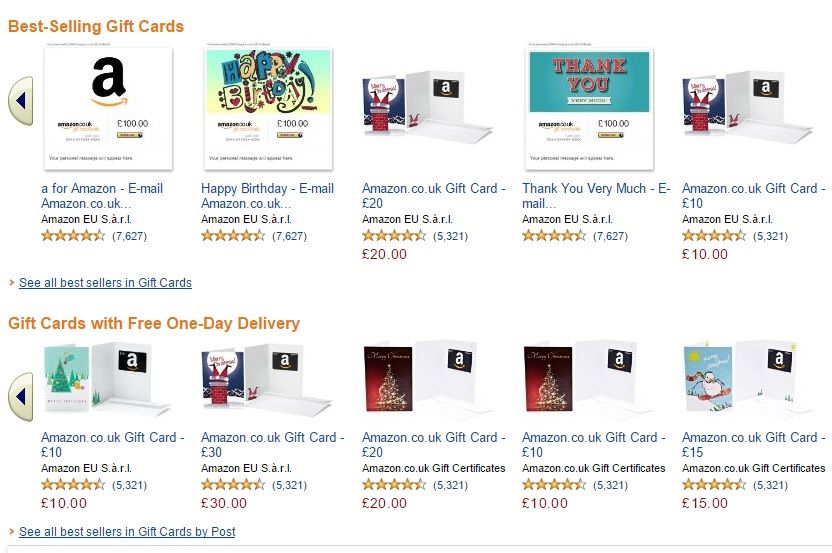
The Amazon gift card page (shown below) serves as an example of 'good' design in this respect, as matching category items are placed in close proximity, whilst the two distinct categories (i.e. 'Best-Selling Gift Cards' and 'Gift Cards with Free One-Day Delivery') are placed further apart. The product descriptions are also positioned close to their corresponding images, so users can make instant selections with the minimum conscious consideration.
Research into Proximity

A number of studies have attempted to quantify the effect of proximity on our perception of sequenced items. For example, Palmer and Beck (2000) carried a study in which subjects were asked to identify pairs of shapes appearing among other non-paired shapes. The researchers then measured the length of time shape-pair detection took for each of the shape sequences. The graphic below shows the relative reaction times for each of the different arrangements of shapes used in Palmer and Beck’s perceptual grouping study.
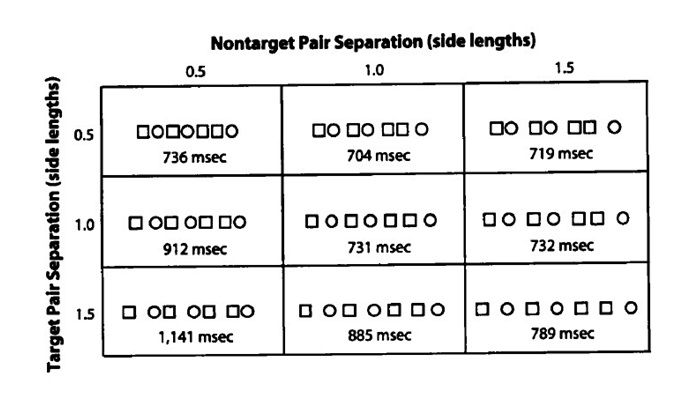

Results showed paired items were detected in the shortest time when they were in close proximity to one another (graph position: X - 1.0, Y - 0.5). However, they also found that the placement of other items had a disruptive or inhibitory effect on identical pair detection. Therefore, it is not enough to simply place grouped items close to one another to facilitate category identification in user interface design. Other items that belong to different groups must be placed far enough away to prevent any negative influence on the immediacy with which users can identify categories and extract relevant information. For example, the two user interface designs below represent ‘good’ and ‘bad’ proximity, respectively.

(You will find much more on arranging information in screen-based interfaces in our course: Gestalt Psychology and Web Design: The Ultimate Guide)


The ‘radio buttons’ design on the left is an example of 'good' proximity, as items have been arranged so that the buttons are in close proximity to the corresponding information yet spaced far enough apart from separate options to reduce the potential for inhibition of correct option selection. However, the right-hand dialog box is arranged in a way that makes all the information appear related, with option buttons and text entry boxes all in close proximity. By ordering items and instituting a logical structure, design can reduce the demand placed on users and help speed up the selection process. Busy user interfaces tax users unnecessarily and slow down navigation speeds, forcing people to scan whole areas before relevant information can be identified.


In Summary

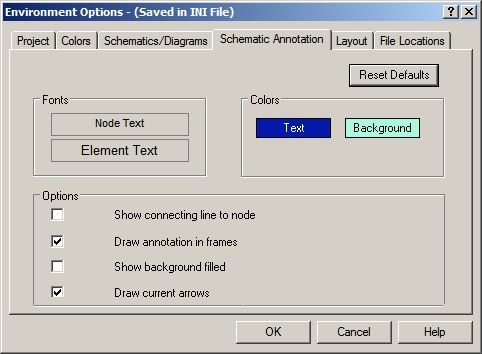
In addition, spacing buttons or text entry boxes far from their corresponding information, such as the ‘Environment Options’ dialog box above, requires eye movements, or saccades, from one to the other. Distance can induce selection errors, as the ability to make immediate choices is impeded.

Proximity is a subtle, but instantly interpreted signal. Interface designers must take this simple aspect of user interface design into consideration to support the way visual information is instantly perceived. User interfaces should be designed so that grouped items are close to one another, but clearly separated from other distinct options, groups, or categories to prevent the inhibitory effect they may have on the speed and accuracy with which users are able to select their intended element.

Header Image: Author/Copyright holder: Society of Petroleum Engineers. Copyright terms and licence: All rights reserved. Img

Fig. 1 Amazon Inc. (Fair Use)Fig. 2 – http://socrates.berkeley.edu/~plab/pdf/Palmer&Beck.pdf Palmer and Beck (2000) (Fair Use)
Fig. 3 – http://www.tutorialsforopenoffice.org (All Rights Reserved Used Without Permission)
Fig. 3 – http://img.viralpatel.net/add-element-form-html-dynamically-javascript.png – (All Rights Reserved Used Without Permission)

Fig. 4 – National Instruments AWR  (Unknown copyright)

Learn More in This Course:

Learn Design and AI From the Best

Get one powerful email each week, like 314,057 others.

Next email in:

What You Should Read Next

  • Read full article
    Don Norman: How You Can Rapidly Move Up by Thinking in Systems (Not Features) - Article hero image

    Don Norman: How You Can Rapidly Move Up by Thinking in Systems (Not Features)

    How can you move up in a company? Learn the fundamentals of business such as statistics, finance, accounting, marketing, supply chain and administration. How do you do that? One way to do this is to get a Master of Business Administration (MBA) degree. But Don says you can also learn them without go

    Social shares
    610
    Published
    Read Article
  • Read full article
    How to Find Your Voice: Speak with Confidence and Clarity - Article hero image

    How to Find Your Voice: Speak with Confidence and Clarity

    You’ve heard it before “It’s not what you said—it’s how you said it.” Your voice can change how people feel—even if your message doesn’t. If you vary your tone and pacing, you can make your ideas sound more trustworthy, exciting, or urgent. Harness this neuroscience-backed communication power and yo

    Social shares
    450
    Published
    Read Article
  • Read full article
    Avoid Death by PowerPoint: Structure Your Slides for Maximum Impact - Article hero image

    Avoid Death by PowerPoint: Structure Your Slides for Maximum Impact

    Your message is ready, your delivery honed. Now, how do you put that brilliance on slides? Discover how to structure your slide deck strategically so that it supports your message, whether you present live or share it for independent review.Whether you're pitching to stakeholders, leading a team mee

    Social shares
    422
    Published
    Read Article
  • Read full article
    Use Feedback as Your Superpower: Learn, Improve, Shine - Article hero image

    Use Feedback as Your Superpower: Learn, Improve, Shine

    Feedback: the word alone can inspire apprehension. Yet, it’s the lifeblood of great design. Whether it’s subtle critique or blunt rejection, how you respond to feedback matters more than you think. You can defend your design—or you can use that moment to learn, improve, and show you're the kind of p

    Social shares
    338
    Published
    Read Article
  • Read full article
    Overcome the Self-Doubt That Stops You from Being an Excellent Presenter - Article hero image

    Overcome the Self-Doubt That Stops You from Being an Excellent Presenter

    Do you doubt your ability to speak up, thinking you’re not the public speaking type? Many people do. But the truth is, most beliefs about presentation skills are simply wrong. Let’s break down these myths and boost your confidence—you’ve got far more potential than you think.In the next video, Morga

    Social shares
    311
    Published
    Read Article
  • Read full article
    Present Like a Pro: Become a Designer Who Leads - Article hero image

    Present Like a Pro: Become a Designer Who Leads

    Your ideas are only as powerful as your ability to communicate them. You can design the perfect solution ... but if nobody understands it, cares about it, or champions it? It goes nowhere. If you can master presentation skills, you’ll open new doors in your design career, access new opportunities, a

    Social shares
    319
    Published
    Read Article
  • Read full article
    Presentation Pitfalls and How You Avoid Them - Article hero image

    Presentation Pitfalls and How You Avoid Them

    You’ve worked hard on your ideas—don’t let simple messaging missteps keep them from landing. Make your brilliant ideas shine in every presentation by deftly sidestepping common messaging missteps, and give your hard work the influence it deserves every time.Morgane Peng, Head of Product Design & AI

    Social shares
    327
    Published
    Read Article
  • Read full article
    How to Change Your Career from Software Development to UX Design - Article hero image

    How to Change Your Career from Software Development to UX Design

    Most people believe that an aesthetic sense or a formal education in visual design is necessary to become a user experience (UX) designer. This perception unfortunately becomes an obstacle for software developers who want to switch their career to UX design.If you’re a software developer who wants t

    Social shares
    727
    Published
    Read Article
  • Read full article
    Design League Savings, AI Tutor, and Pricing Updates - Article hero image

    Design League Savings, AI Tutor, and Pricing Updates

    Rikke and I started IxDF in 2002 with nothing. We lived in a bamboo hut in Thailand with no investors, no safety net, and no plan B. We had a conviction that world-class design education should not be a privilege reserved for people who could afford a $15,000 degree.That conviction has never changed

    Social shares
    162
    Published
    Read Article
  • Read full article
    If You Don’t Fail, You’re Not Trying Hard Enough - Article hero image

    If You Don’t Fail, You’re Not Trying Hard Enough

    In some cultures, people never recover from failure, and Don Norman says this is wrong. In other cultures, failure is seen as a way to learn. David Kelley, the founder of design firm IDEO, once said, “Fail faster, succeed sooner.” Don says this is good, but encourages us to take it one step further,

    Social shares
    606
    Published
    Read Article

Top Articles

Top Topic Definitions

39% of Today's Skills Will Change by 2030

The World Economic Forum expects 39% of today's skills to be transformed or become outdated by 2030.

The good news is that jobs in UX / UI design and AI are among the fastest-growing professions globally.

Build Skills That Keep You Relevant

Privacy Settings

By using this site, you accept our Cookie Policy and Terms of Use.
Customize
Accept all

Be the One Who Inspires

People remember who shares great ideas.

Share on:

Academic Credibility — On Autopilot

Don't waste time googling citation formats. Just copy, paste and look legit in seconds.

Learn Design and AI From the Best

Get one powerful email each week, like 314,057 others.

Next email in: