A news webpage appears in responsive layouts on a desktop monitor, tablet, and smartphone

Does Responsive Web Design Lead to a Positive User Experience?

• 8 min read

432 Shares
Save

The key word for web designers in the last few years has been “responsive”. The idea is simple, design websites once that automatically work on all screen sizes and devices. It’s a time saving ideal and makes it easier for businesses to maintain a presence online without investing in a completely mobile solution.

But what does that mean for the user experience? Is responsive truly delivering what people want? Or is it a cheap half-way house and instead of being “all things to all men” (or women), more some things to some men, some of the time?

Why Responsive Design Sucks for Me

This article was inspired in part because I have come to hate responsive web design. I know, hate’s a strong word, but that’s exactly how I feel about it.

I’m a writer and I work on a desktop computer. I bought that computer because it offers a large amount of screen real estate. The theory was simple, I can research online in my browser in half the screen and write in the other half. This was a pretty good idea – until every website started going responsive.

When people say “responsive” what they really mean is… this works well on tiny screens. What I get, on my much larger screen, is a shoddier user experience. Menus which used to appear alongside the text? They’re all gone… unless I maximize the browser window. Text often fails to resize to the browser as well… leaving me with huge fonts and a need to scroll sideways…

The utility of my larger screen is disappearing. I’m OK with catering for mobile users but not at the expense of the rest of us. While 60% of people may access the internet via mobile devices (including tablets), 40% do not. You will almost certainly find that many businesses, etc. aren’t using mobile devices for their day-to-day grunt work. The link in this paragraph shows that mobile use is mainly for leisure and shopping not research and work.
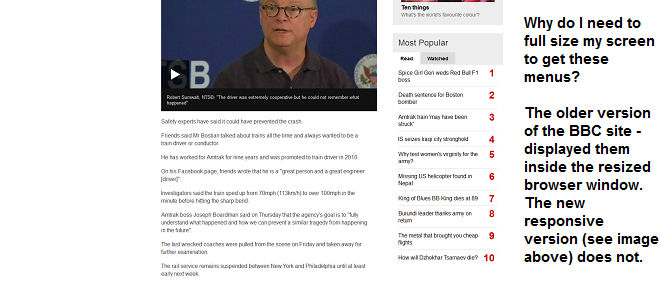


There are other reasons that responsive design can suck the life out of the user experience too:

Why Responsive Design Can Damage the User Experience in Other Ways


Text Can Be Ruined By Line Breaks

You don’t want widows and orphans ruining your prose but using line breaks to protect your text won’t work on responsive designs. The layout on smaller screens can become unmanageable and that means time spent rewriting text so that it works on several formats, which means more testing and more expense to preserve the user experience.

Old Browsers Don’t Like Responsive

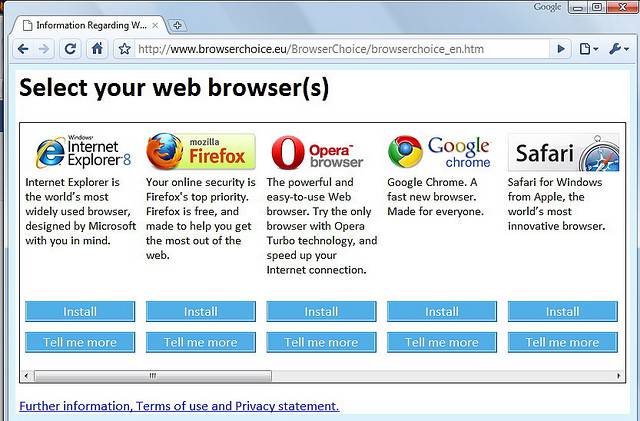
Yes, everyone should use the latest edition of their browser but people don’t. You design with mobile in mind for responsive and that leaves people on old browsers with some pretty dreadful stretched screens when they access your site.


Author/Copyright holder: Pietro Zanarini. Copyright terms and licence: CC BY 2.0

Double Input Support is a Must

Responsive can’t tell the difference between touch and mouse input… which means you need to provide for both or leave a large chunk of your audience out in the cold.

Dynamic Background Images Don’t Work

If you like to use background images, the chances are pretty good that they’re going to look awful on certain screen sizes. Images rarely scale well to fit different screen types.

Vertical Centring is Out of the Question

Vertical centring was always a tough act to pull off but responsive makes it way harder. When elements and rows resize constantly, you need to design clever algorithms to ensure that central position or scrap it altogether.

Page Loading Suffers

It’s a nice idea that we can have the same user experience on every device but it’s really not that case. You have to ensure that all the elements load to deliver the experience. That’s often a slow and painful task on the average smartphone. It means your users are going to experience longer wait times. If you design for mobile, on the other hand, it means your experience won’t be all it can be on the desktop…

Tiny increases in loading times lead to potential customers jumping ship. That’s a big problem. It’s also why so much of internet access on smartphones is via dedicated apps rather than a browser. Apps give a much better user experience for load times than a responsive website can.


Author/Copyright holder: Mihael Mafy. Copyright terms and licence: CC BY-SA 2.0

Animations Can Clash with Responsive Sizing

We like animated elements of websites, when they add to the overall experience, but there’s a growing feeling that animations require a lot more testing within a responsive environment. They seem to be able to mess with page resizing when served in certain sizes.

Checkout Processes Need Careful Thought

There’s a growing body of research that says responsive design checkouts can be much clunkier than their non-responsive counterparts. Bad user experience at shopping checkouts can kill sales. Online payment has to be easy and quick whatever the screen real estate. Otherwise you are losing business… despite the investment in responsive web design.

Final Thoughts on Responsive Web Design

Look, there’s no doubt that responsive web design is a good thing for many users. Smartphones are awesome. It’s not just that they’re handy and convenient. They’re opening up the web to millions of people across the developing world who would otherwise never have been able to get online.

What is true, however, is that responsive web design is not a miracle cure for all screens and sizes. You really need to understand what your users want before you go ahead and deploy responsive design. This is doubly so if the majority of your users access from a desktop or laptop rather than a tablet or mobile device.

We know that the alternative, building multiple versions of your website, comes with its own set of issues and challenges. In particular, maintenance of multiple versions can be a complete PITA. However, there is a good case for doing so in that’s what your users really need.

Header Image: Author/Copyright holder: Intel Free Press. Copyright terms and licence: CC BY-SA 2.0

Learn More in This Course:

Learn Design and AI From the Best

Get one powerful email each week, like 314,303 others.

Next email in:

What You Should Read Next

  • Read full article
    Don Norman: How You Can Rapidly Move Up by Thinking in Systems (Not Features) - Article hero image

    Don Norman: How You Can Rapidly Move Up by Thinking in Systems (Not Features)

    How can you move up in a company? Learn the fundamentals of business such as statistics, finance, accounting, marketing, supply chain and administration. How do you do that? One way to do this is to get a Master of Business Administration (MBA) degree. But Don says you can also learn them without go

    Social shares
    609
    Published
    Read Article
  • Read full article
    How to Find Your Voice: Speak with Confidence and Clarity - Article hero image

    How to Find Your Voice: Speak with Confidence and Clarity

    You’ve heard it before “It’s not what you said—it’s how you said it.” Your voice can change how people feel—even if your message doesn’t. If you vary your tone and pacing, you can make your ideas sound more trustworthy, exciting, or urgent. Harness this neuroscience-backed communication power and yo

    Social shares
    449
    Published
    Read Article
  • Read full article
    Avoid Death by PowerPoint: Structure Your Slides for Maximum Impact - Article hero image

    Avoid Death by PowerPoint: Structure Your Slides for Maximum Impact

    Your message is ready, your delivery honed. Now, how do you put that brilliance on slides? Discover how to structure your slide deck strategically so that it supports your message, whether you present live or share it for independent review.Whether you're pitching to stakeholders, leading a team mee

    Social shares
    421
    Published
    Read Article
  • Read full article
    Use Feedback as Your Superpower: Learn, Improve, Shine - Article hero image

    Use Feedback as Your Superpower: Learn, Improve, Shine

    Feedback: the word alone can inspire apprehension. Yet, it’s the lifeblood of great design. Whether it’s subtle critique or blunt rejection, how you respond to feedback matters more than you think. You can defend your design—or you can use that moment to learn, improve, and show you're the kind of p

    Social shares
    336
    Published
    Read Article
  • Read full article
    Overcome the Self-Doubt That Stops You from Being an Excellent Presenter - Article hero image

    Overcome the Self-Doubt That Stops You from Being an Excellent Presenter

    Do you doubt your ability to speak up, thinking you’re not the public speaking type? Many people do. But the truth is, most beliefs about presentation skills are simply wrong. Let’s break down these myths and boost your confidence—you’ve got far more potential than you think.In the next video, Morga

    Social shares
    309
    Published
    Read Article
  • Read full article
    Present Like a Pro: Become a Designer Who Leads - Article hero image

    Present Like a Pro: Become a Designer Who Leads

    Your ideas are only as powerful as your ability to communicate them. You can design the perfect solution ... but if nobody understands it, cares about it, or champions it? It goes nowhere. If you can master presentation skills, you’ll open new doors in your design career, access new opportunities, a

    Social shares
    317
    Published
    Read Article
  • Read full article
    Presentation Pitfalls and How You Avoid Them - Article hero image

    Presentation Pitfalls and How You Avoid Them

    You’ve worked hard on your ideas—don’t let simple messaging missteps keep them from landing. Make your brilliant ideas shine in every presentation by deftly sidestepping common messaging missteps, and give your hard work the influence it deserves every time.Morgane Peng, Head of Product Design & AI

    Social shares
    325
    Published
    Read Article
  • Read full article
    How to Change Your Career from Software Development to UX Design - Article hero image

    How to Change Your Career from Software Development to UX Design

    Most people believe that an aesthetic sense or a formal education in visual design is necessary to become a user experience (UX) designer. This perception unfortunately becomes an obstacle for software developers who want to switch their career to UX design.If you’re a software developer who wants t

    Social shares
    726
    Published
    Read Article
  • Read full article
    Design League Savings, AI Tutor, and Pricing Updates - Article hero image

    Design League Savings, AI Tutor, and Pricing Updates

    Rikke and I started IxDF in 2002 with nothing. We lived in a bamboo hut in Thailand with no investors, no safety net, and no plan B. We had a conviction that world-class design education should not be a privilege reserved for people who could afford a $15,000 degree.That conviction has never changed

    Social shares
    158
    Published
    Read Article
  • Read full article
    If You Don’t Fail, You’re Not Trying Hard Enough - Article hero image

    If You Don’t Fail, You’re Not Trying Hard Enough

    In some cultures, people never recover from failure, and Don Norman says this is wrong. In other cultures, failure is seen as a way to learn. David Kelley, the founder of design firm IDEO, once said, “Fail faster, succeed sooner.” Don says this is good, but encourages us to take it one step further,

    Social shares
    605
    Published
    Read Article

Top Articles

Top Topic Definitions

39% of Today's Skills Will Change by 2030

The World Economic Forum expects 39% of today's skills to be transformed or become outdated by 2030.

The good news is that jobs in UX / UI design and AI are among the fastest-growing professions globally.

Build Skills That Keep You Relevant

Privacy Settings

By using this site, you accept our Cookie Policy and Terms of Use.
Customize
Accept all

Be the One Who Inspires

People remember who shares great ideas.

Share on:

Academic Credibility — On Autopilot

Don't waste time googling citation formats. Just copy, paste and look legit in seconds.

Learn Design and AI From the Best

Get one powerful email each week, like 314,303 others.

Next email in: